One LinkedIn unified inbox
for every account you run.
Every reply from every connected LinkedIn account, in one thread view. AI triages each conversation hot, warm, or cold, drafts a response in your voice, and pauses the sequence the moment someone writes back.
14-day free trial · no credit card · cancel anytime
Replies are where pipeline is won or lost.
The hard part of LinkedIn outreach isn’t sending — it’s keeping up with what comes back. Run automated outreach across three, five, or ten accounts and replies scatter across as many separate LinkedIn inboxes. Hot leads wait behind “not interested,” and the fastest way to waste a good campaign is to answer its replies two days late.
The unified inbox pulls every conversation from every account you manage in one workspace into a single prioritized queue. Agencies work it per client, sales teams work it per territory, and the AI keeps the queue sorted so the next thread you open is always the one most likely to become a meeting.
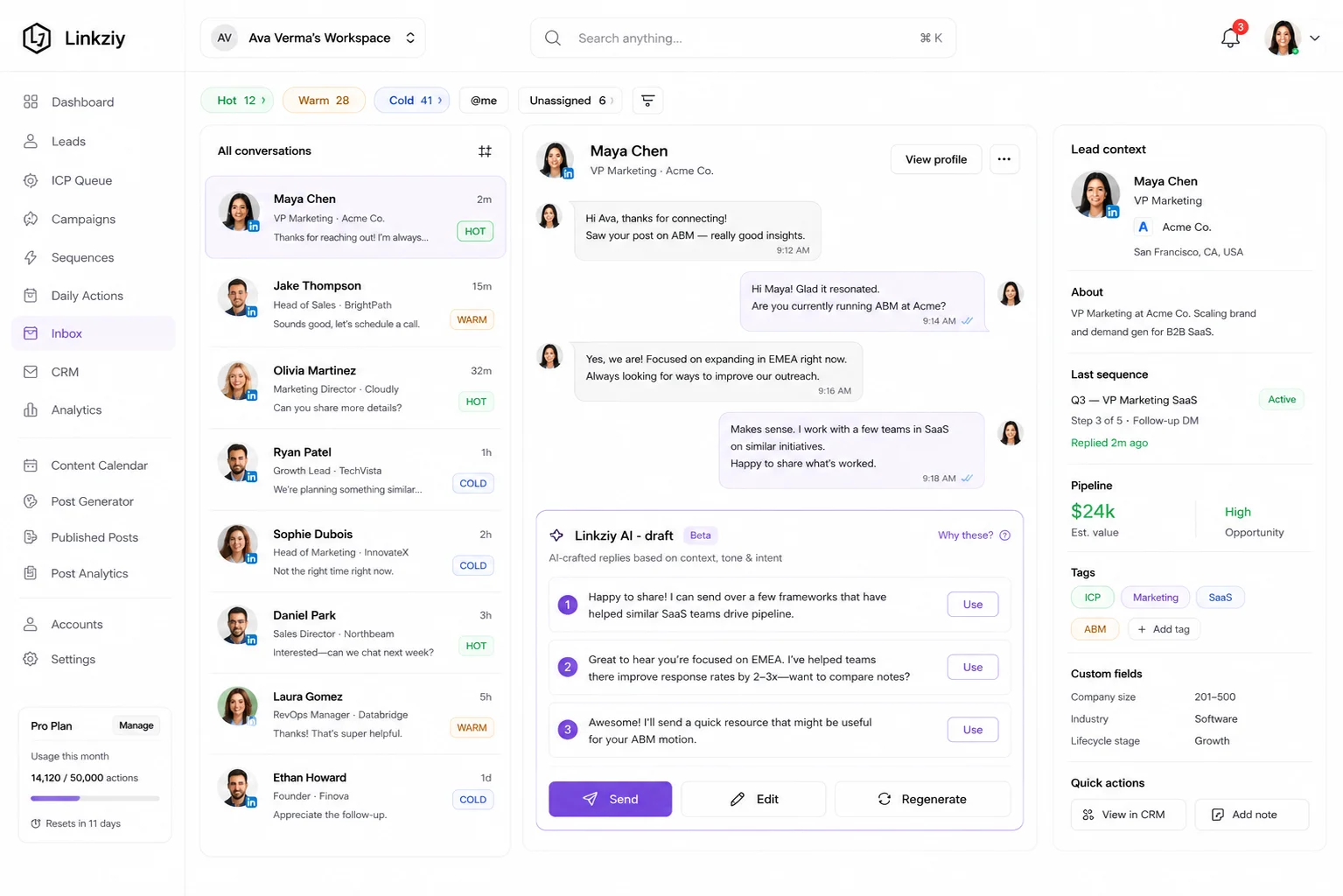
Everything the inbox handles for you.
Every reply, one thread
All LinkedIn DMs from all your accounts in one inbox. No more checking five browser tabs to find out who wrote back.
Hot / warm / cold triage
AI scores every reply by intent. Hot leads bubble to the top; polite passes stop stealing your attention.
AI-drafted replies
Open a thread, see a reply pre-written in your voice. One click to send, edit, or regenerate.
Snooze + remind
Push threads back into your inbox on your terms. Never lose a follow-up to inbox chaos.
Assign to teammates
Route a thread to a colleague with one click. Notes, mentions, internal comments — all on the thread.
Templates + macros
Save your best reply patterns. Insert with a slash command, personalized by AI on send.
Every reply read, classified, and drafted — in minutes.
Reply speed matters: a prospect who answered you is paying attention right now, not next Tuesday. The inbox’s auto-reply layer reads each incoming message, works out what the prospect actually wants, and has a response in your tone waiting before you’ve opened the thread. You stay in control of what goes out — the AI just removes the blank-page delay between “they replied” and “you answered.”
Intent detection on every reply
The moment a prospect replies, AI reads the message and classifies it: interested, curious, not now, or not a fit.
Drafted in your tone
Each classification gets a draft written in your voice — same phrasing, same energy as if you typed it yourself.
Intent-aware routing
Hot leads go straight to the top of your inbox. Curious replies get a soft follow-up draft. Negatives get a polite close-out.
Human override, always
Every draft is editable before send, and you can set review-first mode on high-stakes conversations.
Sequence pauses cleanly
The instant a reply lands, the original sequence pauses for that prospect. No awkward “I replied, here’s another DM.”
From reply
to booked meeting.
Solo operators clear the queue in one pass. Teams route threads to whoever owns the account or the client — assignments, notes, and mentions live in the team workspace, so handoffs don’t happen in Slack screenshots. Agencies running client outreach at scale filter the same inbox per client folder.
- 01
Replies stream in
Every DM from every connected LinkedIn account arrives in the unified inbox in real time.
- 02
AI scores & drafts
Each thread gets a temperature tag — hot, warm, or cold — and a one-click reply draft in your voice.
- 03
Send, snooze, route
Approve a draft, snooze for later, or assign to a teammate. Everything stays tracked on the thread.
Questions,
honestly answered.
Need something specific? Ask us directly — we answer during business days.
What is a LinkedIn unified inbox?
How many LinkedIn accounts can the inbox combine?
Does the AI send replies without me?
What happens to the sequence when someone replies?
Your LinkedIn Growth OSis waiting.
Connect your accounts and watch every reply land in one triaged queue — hot leads first, drafts ready, sequences paused the moment someone writes back.