LinkedIn automation
that keeps your account safe.
Connection requests, DMs, follow-ups, and profile visits — personalized by AI from each prospect’s profile, paced like a human, and paused the moment anyone replies. Built cloud-first, with a dedicated proxy per account.
14-day free trial · no credit card · cancel anytime
The manual work of outbound, off your plate.
A LinkedIn automation tool is only useful if it covers the whole motion, not just one step of it. Linkziy automates the four activities that eat an outbound rep’s day: sending personalized connection requests, running multi-step DM follow-ups, visiting and engaging with prospect profiles, and warming leads before the first ask. You define the audience — typically a list pulled in through LinkedIn lead collection — and the engine executes every touch on schedule, across every account you run.
What it deliberately does not automate: the conversation. When a prospect replies, automation stops for that person and a human (helped by AI drafts) takes over in the unified inbox. Automation gets you to the conversation; it doesn’t fake its way through one.
Connection requests
Personalized invites with a note written from each prospect’s profile, paced to your account’s limits and sent on a human-looking schedule.
Direct messages & follow-ups
Multi-step DM cadences with delays, branches, and conditional follow-ups. Every step stops the moment a prospect replies.
Profile visits & engagement
Profile views, post likes, and comments that put your name in a lead’s notifications before the first message ever lands.
Lead warm-up touches
Engagement-first sequences that warm a lead over days before the connection request fires — the same mechanism behind our warm-up module.
Build the play once.
Run it on every lead.
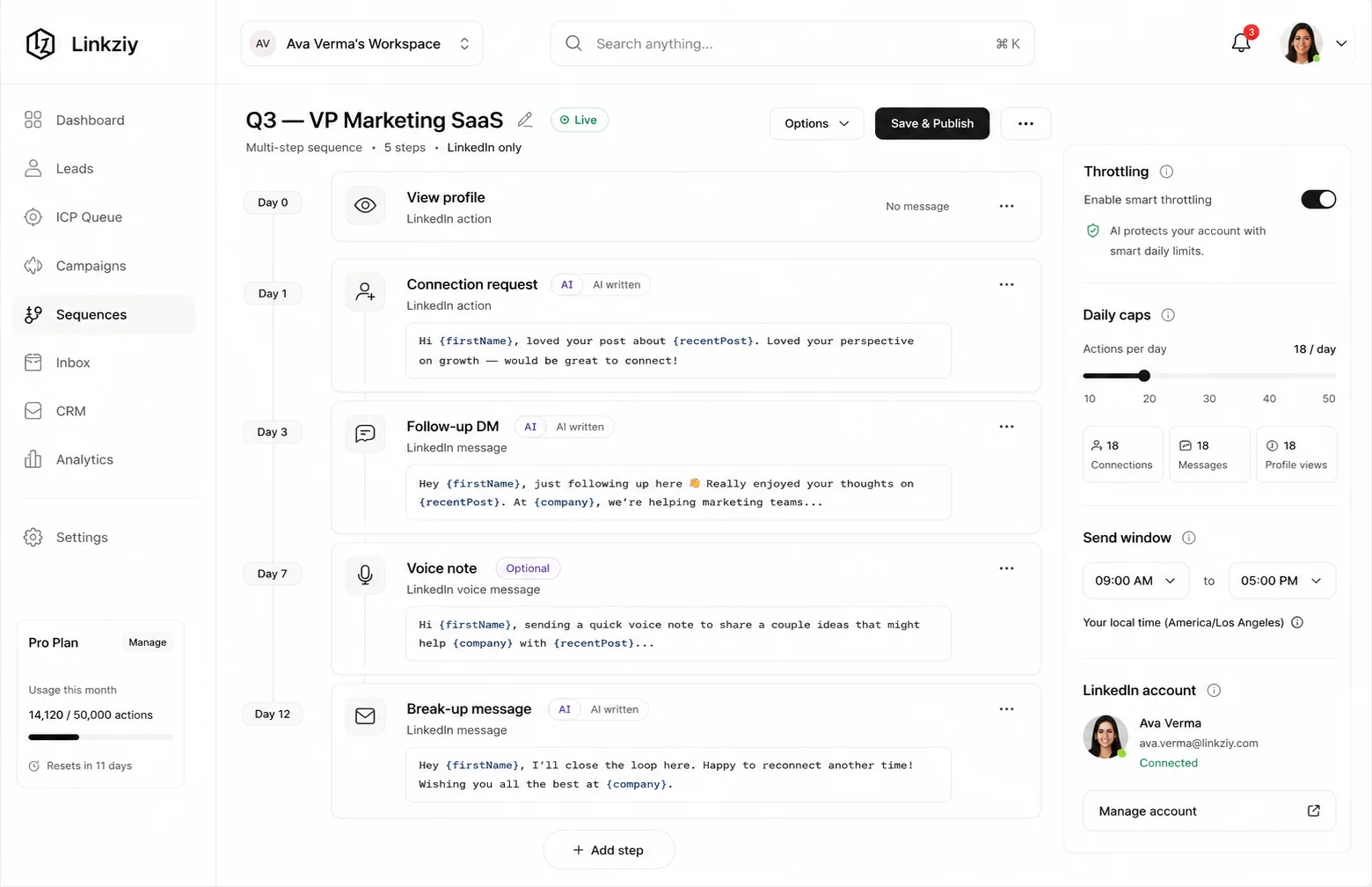
Sequences are where automation earns its keep. On a visual canvas you chain the steps — profile visit, connection request, delay, message, another delay, follow-up — and add the logic between them. Accepted but silent for four days? Send the follow-up. Viewed your profile back? Like their latest post first. Replied? Stop everything and hand the thread to you.
Delays are timezone-aware and skip weekends by default, with jitter added between actions so no two leads see the same clockwork rhythm. Before launch, a live preview shows a sample run against a real lead from your list — the actual copy each step will send, and when — so nothing goes out sight-unseen.
A typical play: visit the profile on day one, like a recent post on day two, send the connection request with a personalized note on day three. If accepted, wait two days, then open with a question about something they published. Silent for five more days? One short follow-up, then stop. That entire flow is a dozen drag-and-drop blocks — and once built, it runs on every lead in the list.
Visual sequence builder
Drag-and-drop canvas: connection → delay → message → profile view → reply branch. No flowchart degree required.
Conditional branches
“If replied → pause.” “If accepted → DM.” “If viewed back → like a post.” Logic without a Zapier subscription.
Smart delays
Respect prospect timezones, skip weekends, and add jitter between actions so the cadence reads as human, not cron job.
Live preview
See a sample run for any real lead in your list before you launch — exactly what each step will say, and when.
Auto-pause on reply
The sequence stops the instant a prospect replies. No “I replied, here’s another DM” embarrassment, ever.
Clean handoffs
Replies route into the unified inbox with hot/warm/cold triage, and contacts sync to HubSpot, Salesforce, or Pipedrive.
Openers grounded in the actual profile.
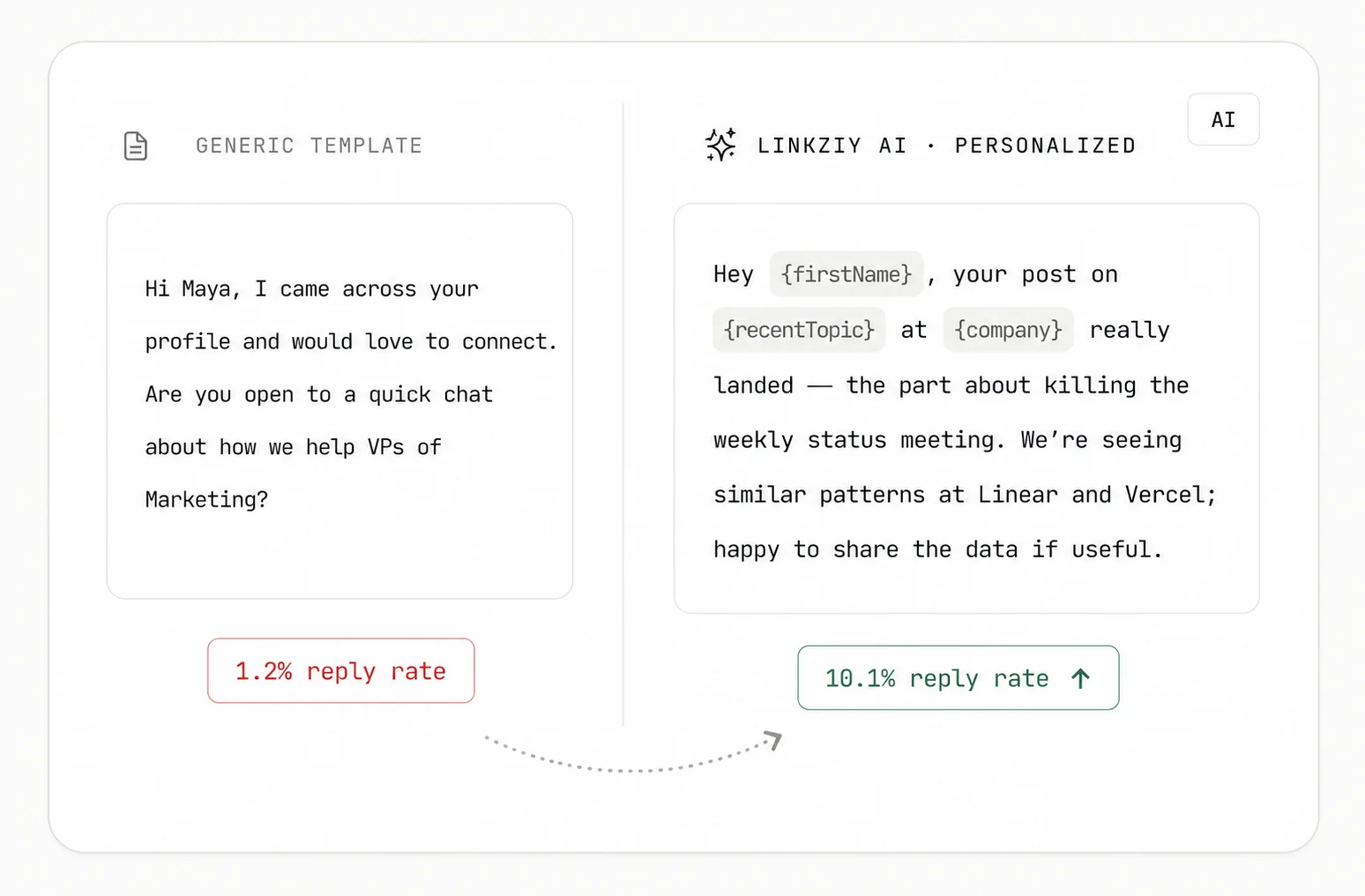
Templated outreach fails because everyone can smell a template. Instead of mail-merging
{first_name} into a stock line, Linkziy’s AI reads
each prospect’s profile, headline, and recent posts before writing a word. The opener it drafts
references something real — a post they published, a role change, a mutual connection — because it
was written from that context, not pasted around it.
Train it once on your own past messages and posts and every draft comes out in your voice. Save separate tone profiles for different audiences — a founder, a VP of marketing, and a recruiter shouldn’t get the same register. Smart variables pull in recent activity and company context automatically, and every step of a sequence is rewritten per prospect rather than sent verbatim. The same engine later drafts your replies — see how that works in the inbox with AI-drafted replies.
Built to protect the account, not just to send fast.
Most LinkedIn restrictions trace back to two design choices: browser extensions that expose automation directly to LinkedIn’s frontend, and shared IP pools that tie your account to whatever another customer just did. Linkziy avoids both by design. Every account runs in an isolated cloud session on its own dedicated residential proxy (or a proxy you bring), so from LinkedIn’s side each account looks like one person, in one place, on one device.
On top of that isolation sits pacing: per-account caps, randomized intervals, working-hours windows, and gradual warm-up ramping for new or quiet accounts. If activity ever trends toward risk, the account auto-pauses and tells you why. The same architecture is what makes running multiple LinkedIn accounts viable without cross-contamination. For the habits that matter on your side of the keyboard, read our guide on avoiding LinkedIn account suspension.
- Run inside your own browser, injecting scripts into LinkedIn’s pages — patterns LinkedIn can fingerprint directly.
- Tie every action to your personal IP address and device.
- Stop working the moment your laptop sleeps or the tab closes.
- Runs in an isolated cloud session per account — nothing installed in your browser, nothing injected into LinkedIn’s frontend.
- Each account operates from its own dedicated residential IP, or a proxy you bring.
- Sequences keep running on schedule whether your machine is on or not.
Cloud sessions, not a Chrome extension
Linkziy runs in the cloud with a persistent, isolated browser session per account. Nothing is injected into your own browser for LinkedIn to fingerprint.
Dedicated proxy per account
Every connected account gets its own clean residential IP — or bring your own proxy. No shared pools, no cross-contamination between accounts.
Throttling & daily caps
Per-account rate limits on invites, messages, and visits. You set the ceiling; Linkziy spreads activity across the day instead of bursting it.
Human pacing
Randomized intervals, working-hours windows, weekend skips. Activity patterns are shaped to look like a person at a desk, not a script.
Auto-pause everywhere
Replies pause the sequence. Risk signals pause the account. You can always see why something paused and resume with one click.
Warm-up ramping
New and quiet accounts start at low volume and ramp gradually week over week instead of jumping straight to full send.
The limits are real.
Plan around them.
Any tool promising unlimited sending is promising you a restricted account. For most profiles, LinkedIn’s practical ceiling sits around 80–100 connection requests per week, with message and profile-view limits that vary by account age, SSI, and whether you’re on Premium or Sales Navigator.
Linkziy works with those limits instead of pretending they don’t exist: caps are configurable up to roughly 100 personalized invites per day for accounts that can sustain it, defaults start well below that, and warm-up ramps volume gradually. Need more reach? The honest answer is more senders — that’s what multi-account management is for — not pushing one account past its ceiling.
For the current numbers by account type, see our LinkedIn connection limits guide.
Roughly 80–100 per week for most accounts. Older, warmed accounts with strong acceptance rates sustain more; new accounts should send far fewer.
Message volume to existing connections is more forgiving, but bursts still get flagged. Linkziy spreads sends across your working hours.
Visits, likes, and comments have their own soft limits. Warm-up touches count toward them, so Linkziy budgets all activity per account, together.
Anyone whose pipeline starts on LinkedIn.
The mechanics are the same for everyone — collect, sequence, reply — but the shape of the workflow changes with the team. A two-person startup runs one account and lives in the inbox; an agency runs thirty accounts across ten clients and lives in the reports. Linkziy is built so the same engine serves both ends of that spectrum.
Run disciplined multi-touch cadences on every territory list without living inside LinkedIn all day.
LinkedIn automation for SDRsOperate outreach for many clients from one dashboard, each client’s accounts isolated on their own proxies.
How agencies run LinkziyFounder-led sales without the founder doing the clicking — personalized outbound that runs while you build.
Founder-led outboundLinkziy isn’t the right pick for everyone.
If you only need outbound sequences, Expandi is a credible alternative; if you only need content scheduling, so is Taplio. Linkziy’s case is running outreach, inbox, and content from one place. We keep feature-by-feature breakdowns — including where competitors win — on our comparison pages, starting with Linkziy vs Expandi — or see how we stack up against Dripify, Waalaxy, and the rest of the market in our 2026 tools roundup. Pricing for every module is on the pricing page.
Questions,
honestly answered.
Need something specific? Ask us directly — we answer during business days.
Is LinkedIn automation safe for my account?
Is LinkedIn automation against LinkedIn’s terms of service?
How many connection requests can I send per day?
Is Linkziy a Chrome extension or a cloud tool?
Can I use my own proxies?
What happens when a prospect replies?
Your LinkedIn Growth OSis waiting.
Connect a LinkedIn account, build your first sequence, and let Linkziy pace it safely. Replies land in one inbox, triaged and drafted for you.